Your child watches real YouTube.
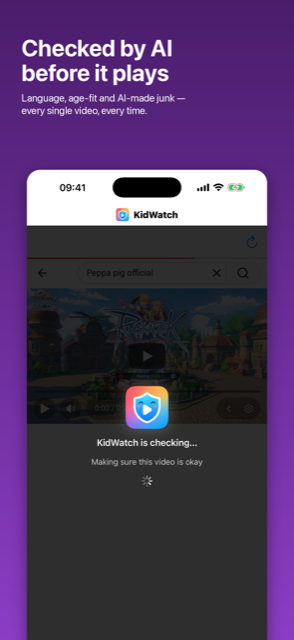
AI checks every video first.
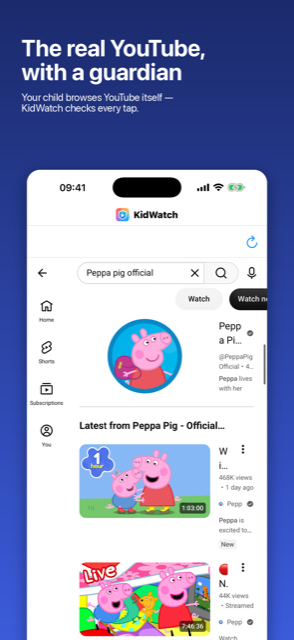
Not a walled garden. Not a kid-sized library. The actual YouTube your child asks for — with a check in front of every single video, and a dashboard that tells you exactly what it decided and why.
Download on the App Store
Free to download · iPhone & iPad · iOS 16+
🎁 Your first month is free — no code, no card upfront. Just download and start.
Why not just YouTube Kids?
Because children outgrow it and start asking for the real thing — and because it still serves algorithmic junk without ever telling you why it chose it.
KidWatch takes the opposite approach. Your child browses real youtube.com, exactly the app they actually want. But the moment they tap a video, playback pauses and the video gets read before a single frame plays.
When the AI isn't sure, the video doesn't play. KidWatch chooses to close, not open. A video that can't be checked is a video that stays blocked.
What gets checked, before every video
Language
Only the languages you choose — 24 supported, from English and Malay to Hindi and Japanese. Anything else is skipped automatically.
Age-appropriateness
A 5-year-old and an 11-year-old get different answers. Each child profile has its own age and its own limits.
AI-made content
Synthetic voices, AI animation and mass-produced "content farm" videos get filtered out.
Your own rules
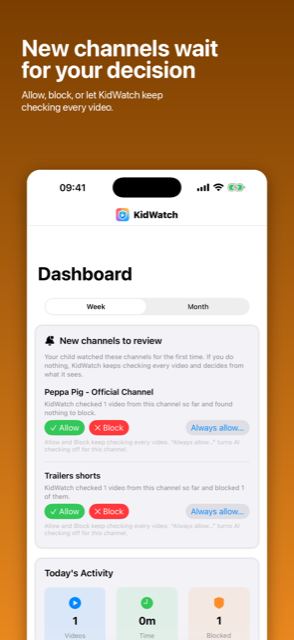
Block channels or keywords. Always-allow the favourites you already trust.
Built for real families
- A profile for each child — own languages, own age, own limits
- Daily time limits and "take a break" session caps that survive app restarts
- Bedtime mode — videos sleep when your child should
- Ask-a-Parent — when the AI isn't sure, you decide with your PIN
- Smart channel learning — trusted channels start instantly, repeat offenders get blocked automatically
- Comments stay hidden, and browsing is held to an allowlist
One app, not two. There's no second "monitoring" app to install on your child's device. The parent area is PIN-protected, stored in your device Keychain.
Questions parents actually ask
Does my child see the real YouTube, or a copy?
The real one — real youtube.com, including its own home feed and recommendations. KidWatch doesn't rebuild YouTube; it sits in front of playback. Every video your child taps is analysed before it starts, comments are hidden, and navigation is limited to an allowlist.
What happens if the check fails or there's no signal?
The video is blocked. The gate fails closed by design, on every path. A video that couldn't be verified is never given the benefit of the doubt.
How does it know a video is AI slop?
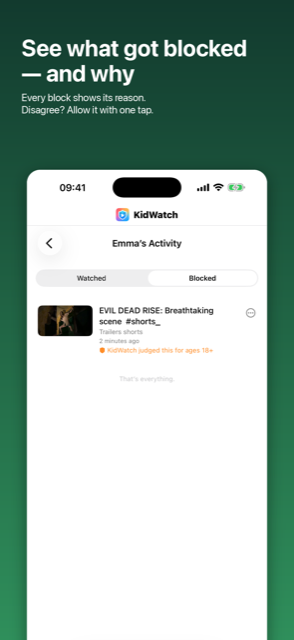
KidWatch reads the video's own metadata — title, description, channel, language fields and YouTube's made-for-kids flag — and passes it to a language model that judges language, minimum suitable age, and whether it looks mass-produced or synthetic. You see the verdict and its reasoning in the dashboard.
Can my child just tap around the check?
No. Playback is intercepted before it begins, the player itself is locked down, and the parent area sits behind a PIN held in the iOS Keychain. If a video isn't approved, there's nothing to tap past.
Is my child's data sold?
Never. KidWatch keeps each child's profile and history so the parent features work, and you can delete your account or any child's data at any time, right inside the app.
What does it cost?
Free to download, and your first month is free automatically — no code, no payment details upfront. Use everything for a month, then decide. Cancel anytime; full terms below.
Pricing, stated plainly
Your first month of KidWatch is free — built in, no code or payment details required. Continuing afterwards requires KidWatch Premium, an auto-renewable monthly subscription at the regular monthly price (US$4.99; shown in the app before you confirm; local prices vary), which starts with a 7-day free trial. Payment is charged to your Apple Account at confirmation of purchase. The subscription renews automatically unless cancelled at least 24 hours before the end of the current period. Manage or cancel in your Apple Account settings.
Download on the App Store
Reading for parents
YouTube Kids alternatives for older children (7–12) — the real options when a child outgrows YouTube Kids but is not ready for unfiltered YouTube, and what each actually costs you.
How to spot and block AI-generated kids' videos on YouTube — what machine-made children's content looks like, why YouTube Kids doesn't filter it out, and every practical option for limiting it, including the ones that aren't an app.
How to turn off YouTube autoplay for kids — the thirty-second change we'd tell any parent to make first, on the iPhone app, YouTube Kids, the web and supervised accounts — plus what it doesn't fix.
How to hide YouTube comments from your child — there is no comments-off switch, so here are the four things that do work, what each really hides, and where every one of them still leaks.
Also from us
SaySprout — for the younger ones. A speech-practice game where nothing moves until your child says the word out loud. No timer, no fail state, and speech recognition that never leaves the device.